Tampilkan postingan dengan label Canon. Tampilkan semua postingan

Canon IP2770 Printer Error code 5B00

| 0 komentar |

Guide on how to reset the Canon Ip2770 Printer

Hardware Reset:
  • Turn off the printer and unplug the power cord
  • Plug the printer power cord 
  • Press the RESUME button for three seconds
  • Press the POWER button until the green lights appear
  • Hold POWER button, don't release the RESUME button
  • Release the Resume button, but do not release the POWER button
  • Hold POWER button while pressing the Resume button 5 times
Led will flash alternately orange glow green with the last orange. (Don�t mistakenly press 4x because the printer will be totally dead and you have to turn unplug the power to turn it off)

  • Release both buttons simultaneously, Led will blink briefly and then will glow GREEN
The computer will detect new devices,  ignore it

Note: Don�t turn off the printer after this procedure is done. Proceed to Software Reset

Software Reset

run Canon iP2770 Software Resetter  
Extract the File iP2770 Resetter 
Prepare a two paper in the printer 
Run the program iP2770 Resetter 

Click "MAIN", then the printer will proceed and iP2770 will print one page with the words "D = 000.0"

Click the "EEPROM Clear" 

Click the "EEPROM", and the printer will print the results off iP2770 Resetter. One of the writing row as follows: "TPage (TTL = 00 000)"

Turn off the printer by pressing the POWER button.

Download the Software Resetter: Click HERE
Read More..

Canon MP245 Printer Counter Resetter

| 0 komentar |
When the error or pop-up message appears on your screen �ink absorber is full�. Your printer needs to reset. Here�s how to fix it

Hardware Reset
  • Turn off the printer without pulling the power cords
  • Hold down STOP/RESET button and press Power button
  • Keep holding down Power button and let STOP/RESET button go
  • Then Press STOP/RESET button twice then let BOTH buttons go
  • The Alternate Blinking error is gone, this means that the printer is in Service Mode state.

Don�t turn off the printer after hardware reset, then proceed to next step �Software Reset�.

Software Reset
  • Extract and double click MP245.exe
  • Click Reload Button and you will get a new USB port
  • Load  papers in your printer and press the "Main" Button once
  • Wait until the printing is done
  • Press "EEPROM Clear" button to clear EEPROM
  • Press EEPROM button and the printer will print a page of  text
  • Turn  off the power of  printer(sometimes you have to press twice the power button to turn off)
  • turn on again and its done
 download canon resetter
Read More..

Download Specifications Canon PIXMA MG2220 Photo Printer and Drivers

| 0 komentar |
Utilizing Canon�s Inkjet printing technology, this all-in-one printer delivers up to 4800 x 1200 dpi (Color) and up to 600 x 600 dpi (Black) to ensure you only get nothing but brilliant and excellent printouts all the time. Plus, it produces 4.8 ipm and 8.4 ipm for color and black prints respectively, so you can create high-quality prints in less time.

The Canon PIXMA MG2220 6221B030 Photo All-In-One Printer can also be used as a scanner or copier. And with its fast-speed USB connector, you can easily produce outstanding printouts from your PCs.

Specifications


Print MethodInkjet
Color OutputColor
Fax CapabilityNo
All-In-OneYes
Printer UsePhoto
Network ReadyYes
Automatic FeederYes
ResolutionUp to 600 x 600 dpi (Black)
Up to 4800 x 1200 dpi (Color)
Print Speed B/W8.4 ipm
Print Speed Color4.8 ipm
Special FeaturesBorder Free Printing
Copying Capability
Scanning Capability
ConnectivityHi-Speed USB
Standard Paper Output100 Sheets
Paper Sizes SupportedLetter
Legal
4" x 6"
5" x 7"
8" x 10"
Envelopes (No. 10)
Scanner TypeFlatbed
Optical Resolution1200 x 2400 DPI
Dimensions17.7"W x 12.0"D x 6.0"H

More Details of Canon PIXMA MG2220

Download Drivers  Canon PIXMA MG220 Photo All-In-One Printer
Read More..

Service Canon MX328 Printer

| 0 komentar |
Canon Pixma MX328 is one of the Inkjet multifuction (Print, Scan, Copy, Fax) printer from Canon. Like general case of printer, after filled by ink usually ink level not full. At some cases of printer, after ink level empty, printer cannot be used to print.

Here the Solution to reset the ink level for Canon Pixma MX328 follow this steps to reset the ink level in your canon MX328.


Option 1
  • Disconnect the power cable
  • Connect it while holding down the power button
  • With the power button still down
  • press twice the "Cancel" red button
  • Release the power button
  • The printer turns into a  factory mode...(wait for about 10 seconds, until the message "Idle" appears)
  • Press the ">" (next to the "OK" button) once."Shipping Mode 3"
  • Press the "OK" button
  • Press "OK" again for "Without cleaning"
  • A test page will print
  • Open the cover
  • Disconnect the power cable again
  • Take out both cartridges
  • Close the cover
  • Connect the power cable once again
  • Turn the printer on
  • Now just put the cartridges back
Opton 2

  • Switch off the Canon MX328 and disconnect the power cable
  • While press and hold the power button, Connect the power cable to electric socket
  • While pressing the power button, press the �Cancel� button (red button)
  • Now release the power button and the printer turns into a kind of factory mode. Wait for 10 seconds until it says �idle�
  • Press �>� (next button) once �Shipping Mode 3?
  • Press the �OK� button. Press �OK� again for �without cleaning�
  • A test page will print
  • Open the cover, like you are about to change the cartridges
  • Disconnect the power cable again without switch off the printer
  • Take out the both cartridges
  • Close the cover
  • Connect the power cable and turn on the printer
  • put the cartridges back and the ink level in the canon Pixma MX300 have full again.
To finish resetting.. Download the software reset program
Software

Click here to Download Canon Service Tools
Read More..

Canon PIXMA MX392 All-in-One Printer Driver and Specs

| 0 komentar |
Combining various functionalities like copying, scanning, faxing and color copying. The Canon PIXMA MX392 All-in-One printer is a very useful addition to your office set up. Printing in Black and White at 8.7 ipm and color at 5.0 ipm, it ensures bright colored images. You can be sure of detailed images as the printer supports 4800 x 1200dpi Resolution. Incorporating USB technology, it transfers data at a fleeting speed.

This also comes with up to 50 Pages Fax Memory and does not necessitate manual feeding of the paper. The unit goes well with canon PG-240, CL-241, PG-240XXL XXL Black Ink, PG-240XL XL Black Ink and more.

Specifications

Print Method

Inkjet

Color OutputColor
Fax CapabilityYes
All-In-OneYes
Printer UsePlain Paper
Photo
Automatic FeederYes
ResolutionUp to 4800 x 1200 pdi (Color)
Print Speed B/W8.7 ipm
Print Speed Color5.0 ipm
Special FeaturesCopying Capability
Scanning Capability
Fax Capability
Color Copying
ENERGY STAR QualifiedYes
Dimensions18.1"W x 15.2"D x 7.9"H
ProtocolsUSB
Paper Sizes SupportedLetter
Legal
5" x 7"
8" x 10"
4" x 6" Statement
#10 Envelopes
Scanner TypeColor Flatbed
Optical Resolution1200 x 2400 DPI
Transfer Rate33.6 kbps
Fax MemoryUp to 50 Pages

More Details of Canon PIXMA MX392
Canon PIXMA MX392 All-in-One Inkjet Printer Drivers
Read More..

End of Service Life Epson L355 Printer

| 0 komentar |
Repair the ERROR of Epson Stylus L Series L355  printer which have an error of  parts inside printer near end of service life or the ink pad counter overflow  problem. Download Windows 7 32 bit compatible  resetter progrand and follow the steps below to reset the protection counter

Open the program
  • Click �Accept� button to open the program
  • Click �Select� button. and choose your printer model then click �OK�
  • Click �Particular adjustment mode� button
  • Select on �Waste ink pad counter� and click �OK� button
  • Check on Main pad counter and click on �Initialization� button to reset the counter to 0
  • Turn off the printer as a program instructed then turn on again
  • Its done!
Finish

Read More..

Canon iP1000 Reset

| 0 komentar |
This is the manual guide on how to reset the Canon iP1000 printer. Just follow the guide below

Hardware Reset

  • Turn off the printer and disconnect the printer cable.
  • Press and hold the POWER button then turn on the printer.
  • The LED indicator must  be green.
  • Press and release the RESUME button , the indicator (L.E.D.) should be orange.
  • Press and release the RESUME button again, the indicator (L.E.D.) should be green.
  • Release both buttons.
After doing hardware reset don't turn off the printer just proceed two hardware reset

Software Reset
  • Reconnect the printer cable
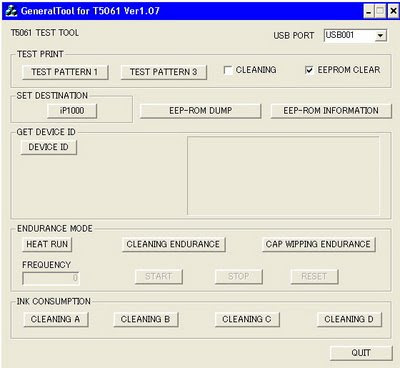
  • Open General Tools Software
  • Select USB Port and then select "EEPROM CLEAR"
  • Push the "MAIN" bottom and "PLATEN" bottom in to "CLEAR WASTE INK COUNTER" box
  • The led printer will be blinking for few moment and it should be reset
  • Finally, push the "RELEASE" bottom and then push the "QUIT" bottom to exit program
  T5061

Click Here to Download the Resetter
Read More..

Canon MX328 Reset

| 0 komentar |
Canon Pixma MX328 is one of the Inkjet multifuction (Print, Scan, Copy, Fax) printer from Canon. Like general case of printer, after filled by ink usually ink level not full. At some cases of printer, after ink level empty, printer cannot be used to print.

Here the Solution to reset the ink level for Canon Pixma MX328 follow this steps to reset the ink level in your canon MX328.


First step:
  • Unplug  the power cord cable
  • Connect it while holding down the power button
  • With the power button still down
  • press twice the "Cancel" red button
  • Release the power button
  • The printer turns into a  factory mode...(wait for about 10 seconds, until the message "Idle" appears)
  • Press the ">" (next to the "OK" button) once."Shipping Mode 3"
  • Press the "OK" button
  • Press "OK" again for "Without cleaning"
  • A test page will print
  • Open the cover
  • Disconnect the power cable again
  • Take out both cartridges
  • Close the cover
  • Connect the power cable once again
  • Turn the printer on
  • Now just put the cartridges back
Second Step

  • Switch off the Canon MX328 and disconnect the power cable
  • While press and hold the power button, Connect the power cable to electric socket
  • While pressing the power button, press the �Cancel� button (red button)
  • Now release the power button and the printer turns into a kind of factory mode. Wait for 10 seconds until it says �idle�
  • Press �>� (next button) once �Shipping Mode 3?
  • Press the �OK� button. Press �OK� again for �without cleaning�
  • A test page will print
  • Open the cover, like you are about to change the cartridges
  • Disconnect the power cable again without switch off the printer
  • Take out the both cartridges
  • Close the cover
  • Connect the power cable and turn on the printer
  • put the cartridges back and the ink level in the canon Pixma MX300 have full again.
To finish resetting.. Download the software reset program
Software

Click here to Download Service Tools
Read More..