Tampilkan postingan dengan label Canonreset. Tampilkan semua postingan

Counter Adjustment Reset of Canon iP2700 series Printer

| 0 komentar |
This is the utility to reset the canon ip 2700 ink overflow error or you might be cannot print because of orange light or what ever is it.

Just try to follow the guide below. Hope it works in your canon printer

Number 1: HArdware Reset
  • Turn off the printer without unplugging the power cable.
  • Press and hold the RESUME button, then press the Power button.
  • Fixed hold the Power button and release the Resume button.
  • Then press the Resume button 5 times then release both buttons.
  • After the error has stopped blinking mark, your printer has been successfully entered into the Service Mode.
Download Canon  utility

Although you think that you have done resetting, we think that it�s finally over. W have two proceed the second step which is the resetting of its Internet program and that is the software reset

Step 2: Software Reset
  • Extract resetter program above and double click the file �servicetool.exe�
  • Consider whether the Reload button appears. If there is, click the Reload button to get a new USB port. If no, it means that your printer is ready to reset.
  • Prepare some sheets of paper into the printer tray, and press the �Play�, wait until the print stop or display the message �error 001?. Press OK.
  • Then press the �EEPROM� and let the printer print again, and then click OK.
  • Turn off the printer (you may need to press the Power button twice).
  • Turn the printer back on. Voila! Your printer is ready to work again.


Read More..

End of Service Life Epson L355 Printer

| 0 komentar |
Repair the ERROR of Epson Stylus L Series L355  printer which have an error of  parts inside printer near end of service life or the ink pad counter overflow  problem. Download Windows 7 32 bit compatible  resetter progrand and follow the steps below to reset the protection counter

Open the program
  • Click �Accept� button to open the program
  • Click �Select� button. and choose your printer model then click �OK�
  • Click �Particular adjustment mode� button
  • Select on �Waste ink pad counter� and click �OK� button
  • Check on Main pad counter and click on �Initialization� button to reset the counter to 0
  • Turn off the printer as a program instructed then turn on again
  • Its done!
Finish

Read More..

Canon iP1000 Reset

| 0 komentar |
This is the manual guide on how to reset the Canon iP1000 printer. Just follow the guide below

Hardware Reset

  • Turn off the printer and disconnect the printer cable.
  • Press and hold the POWER button then turn on the printer.
  • The LED indicator must  be green.
  • Press and release the RESUME button , the indicator (L.E.D.) should be orange.
  • Press and release the RESUME button again, the indicator (L.E.D.) should be green.
  • Release both buttons.
After doing hardware reset don't turn off the printer just proceed two hardware reset

Software Reset
  • Reconnect the printer cable
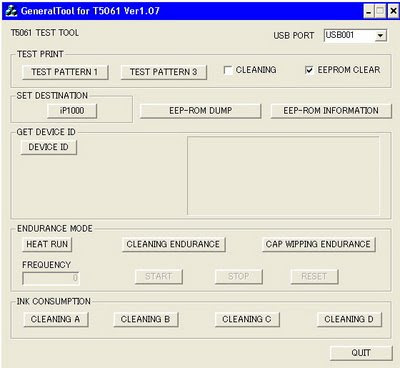
  • Open General Tools Software
  • Select USB Port and then select "EEPROM CLEAR"
  • Push the "MAIN" bottom and "PLATEN" bottom in to "CLEAR WASTE INK COUNTER" box
  • The led printer will be blinking for few moment and it should be reset
  • Finally, push the "RELEASE" bottom and then push the "QUIT" bottom to exit program
  T5061

Click Here to Download the Resetter
Read More..

Canon MX328 Reset

| 0 komentar |
Canon Pixma MX328 is one of the Inkjet multifuction (Print, Scan, Copy, Fax) printer from Canon. Like general case of printer, after filled by ink usually ink level not full. At some cases of printer, after ink level empty, printer cannot be used to print.

Here the Solution to reset the ink level for Canon Pixma MX328 follow this steps to reset the ink level in your canon MX328.


First step:
  • Unplug  the power cord cable
  • Connect it while holding down the power button
  • With the power button still down
  • press twice the "Cancel" red button
  • Release the power button
  • The printer turns into a  factory mode...(wait for about 10 seconds, until the message "Idle" appears)
  • Press the ">" (next to the "OK" button) once."Shipping Mode 3"
  • Press the "OK" button
  • Press "OK" again for "Without cleaning"
  • A test page will print
  • Open the cover
  • Disconnect the power cable again
  • Take out both cartridges
  • Close the cover
  • Connect the power cable once again
  • Turn the printer on
  • Now just put the cartridges back
Second Step

  • Switch off the Canon MX328 and disconnect the power cable
  • While press and hold the power button, Connect the power cable to electric socket
  • While pressing the power button, press the �Cancel� button (red button)
  • Now release the power button and the printer turns into a kind of factory mode. Wait for 10 seconds until it says �idle�
  • Press �>� (next button) once �Shipping Mode 3?
  • Press the �OK� button. Press �OK� again for �without cleaning�
  • A test page will print
  • Open the cover, like you are about to change the cartridges
  • Disconnect the power cable again without switch off the printer
  • Take out the both cartridges
  • Close the cover
  • Connect the power cable and turn on the printer
  • put the cartridges back and the ink level in the canon Pixma MX300 have full again.
To finish resetting.. Download the software reset program
Software

Click here to Download Service Tools
Read More..