Epson Workforce 310 printer reset

| 0 komentar |
Repair the error parts inside printer end service life or,  parts inside printer near end of service life.
Before opening the Epson adjusment �Adjprog.exe�, adjust first the date of your computer depending of what kind of Epson Resetter you have and make sure there is no pending print task in your printer

Download Reset here

Folow the steps below:
  • Open AdjProg.exe
  • Click  Accept
  • Click  Select button, and click your printer model
  • Click "OK"
  • Click the Particular Adjustment Mode
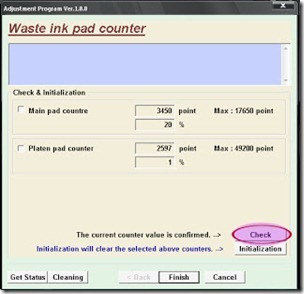
  • Select Waste ink pad counter
  • Click OK
  • Click Initialization (this will reset  counter)
  • Turn off the printer
  • Then turn  on again.

Check this out this Epson Expression Home XP-400 Wireless


Finish

Click here to download the resetter
Read More..

Canon iP1000 Reset

| 0 komentar |
This is the manual guide on how to reset the Canon iP1000 printer. Just follow the guide below

Hardware Reset

  • Turn off the printer and disconnect the printer cable.
  • Press and hold the POWER button then turn on the printer.
  • The LED indicator must  be green.
  • Press and release the RESUME button , the indicator (L.E.D.) should be orange.
  • Press and release the RESUME button again, the indicator (L.E.D.) should be green.
  • Release both buttons.
After doing hardware reset don't turn off the printer just proceed two hardware reset

Software Reset
  • Reconnect the printer cable
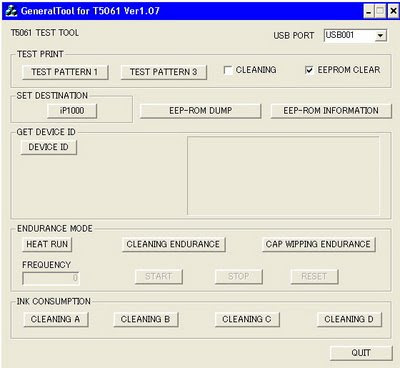
  • Open General Tools Software
  • Select USB Port and then select "EEPROM CLEAR"
  • Push the "MAIN" bottom and "PLATEN" bottom in to "CLEAR WASTE INK COUNTER" box
  • The led printer will be blinking for few moment and it should be reset
  • Finally, push the "RELEASE" bottom and then push the "QUIT" bottom to exit program
  T5061

Click Here to Download the Resetter
Read More..

Canon MX328 Reset

| 0 komentar |
Canon Pixma MX328 is one of the Inkjet multifuction (Print, Scan, Copy, Fax) printer from Canon. Like general case of printer, after filled by ink usually ink level not full. At some cases of printer, after ink level empty, printer cannot be used to print.

Here the Solution to reset the ink level for Canon Pixma MX328 follow this steps to reset the ink level in your canon MX328.


First step:
  • Unplug  the power cord cable
  • Connect it while holding down the power button
  • With the power button still down
  • press twice the "Cancel" red button
  • Release the power button
  • The printer turns into a  factory mode...(wait for about 10 seconds, until the message "Idle" appears)
  • Press the ">" (next to the "OK" button) once."Shipping Mode 3"
  • Press the "OK" button
  • Press "OK" again for "Without cleaning"
  • A test page will print
  • Open the cover
  • Disconnect the power cable again
  • Take out both cartridges
  • Close the cover
  • Connect the power cable once again
  • Turn the printer on
  • Now just put the cartridges back
Second Step

  • Switch off the Canon MX328 and disconnect the power cable
  • While press and hold the power button, Connect the power cable to electric socket
  • While pressing the power button, press the �Cancel� button (red button)
  • Now release the power button and the printer turns into a kind of factory mode. Wait for 10 seconds until it says �idle�
  • Press �>� (next button) once �Shipping Mode 3?
  • Press the �OK� button. Press �OK� again for �without cleaning�
  • A test page will print
  • Open the cover, like you are about to change the cartridges
  • Disconnect the power cable again without switch off the printer
  • Take out the both cartridges
  • Close the cover
  • Connect the power cable and turn on the printer
  • put the cartridges back and the ink level in the canon Pixma MX300 have full again.
To finish resetting.. Download the software reset program
Software

Click here to Download Service Tools
Read More..

Epson L200 End of service life error

| 0 komentar |
Repair the ERROR of Epson L200 printer "parts inside printer end service life, waste ink pad counter overflow error". Click Here to download Epson resetter. This  program is recommended to used in windows xp and windows 7 32 bit computer system. Follow the steps below to reset the protection counter.


Note: Before opening the Epson program,  the exe extenesion or executbale filesadjust first the date of your computer depending of what kind of Epson Resetter do you have

  • Open the program
  • Click �Accept� button to open the program
  • Click "Select" button. and choose your printer model then click "OK"
  • Click �Particular adjustment mode� button
  • Select on �Waste ink pad counter� and click �OK� button
  • Check on Main pad counter and click on �Initialization� button to reset the counter to 0
  • Turn off the printer as a program instructed then turn on again
  • Its done!


Read More..

Epson ME30 End of Service life

| 0 komentar |
Troubleshoot the Printer problem "parts inside printer near end service life� or �parts inside printer end of service life�, but before follow the procedure, make sure that the power of the printer is on, usb cable (cord) properly connected to your computer and most of all there�s no pending print task in your printer.


Follow the steps below:
Click to download resetter
  • Open program
  • Click Accept
  • Click Select button, and click your printer model
  • Click "OK"
  • Click the Particular Adjustment Mode
  • Select Waste ink pad counter
  • Click OK
  • Click Initialization (this will reset counter)
  • Turn off the printer
  • Then turn on again.
Done

Click here to download the resetter
Read More..

Counter Program Epson T60 and Epson T50 Reset

| 0 komentar |
Repair the error of the printer Epson Stylus Photo T60 and Epson T50 Printer "parts inside printer end service life, waste ink pad counter overflow error" "Service Required or alternate blinking problem. Click Here to download the Epson Resetter  Program windows 7 32 bit compatible. This may also works in Epson P60 Printer. This program is recommended to used in Windows Xp Desktop Computer or Laptop Computer.

Follow the steps below

  • Open the Program
  • Click �Accept� button to open the program
  • Click �Particular adjustment mode� button
  • Select on �Waste ink pad counter� and click �OK� button

counterreset
Check on Main pad counter and click on �Initialization� button and the program will reset the protection counter.
  • Turn off the printer as a program instructed then turn on again
  • Click �Finish� button
  • Done!

Read More..

Epson CX4300 Counter Reset program

| 0 komentar |
Repair the Epson CX4300 printer problem by following the troubleshooting guide. The Message �printer near end service life� or �printer end of service life�, it does not mean that you should throw the printer. There was no problem of your printer, the problem is that�s its maximum counter limit value have reach to its maximum allowed.To fix the this kind of problem you need to download the program and before opening the Epson adjustment utility, make sure that the power of the printer is on, properly connected to your computer and most of all there�s no pending print task in your printer.

Click to download program here

Follow the steps below:
  • Open AdjProg.exe
  • Click Accept
  • Click "OK"
  • Click the Particular Adjustment Mode
  • Select Waste ink pad counter
  • Click OK
  • Click Initialization (this will reset counter)
  • Turn off the printer
  • Then turn on again.
Finish!
Click here to download the counter resetter
Read More..