EPSON ME 320 sERIES pRINTER sPECIFICATIONS AND drIVERS

| 0 komentar |
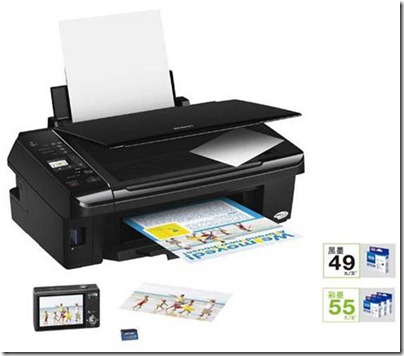
The Epson ME Series. A new breed of inkjet printers built for Maximum Economy. Fully equipped with Epson Micro Piezo� print technology geared to deliver the finest in print and top speed efficiency. Just one machine brings you printing solutions of the ultimate quality. That is all you need.
Enjoy affordable running costs with the all-new 141 inks
  • Built for maximum economy, it delivers optimum print quality and efficiency. With the all-new 141 ink that lowers running costs and maximizes savings, one can truly enjoy economical and high quality printing without needing to go to the professionals.

Ink System 4-colour
Ink Type Epson DURABrite� Ultra Ink
Max. Print Resolution 5760x1440 dpi (with Variable-Sized Droplet Technology)
Min. Ink Droplet size 4 pl
Print Speed BLACK TEXT MEMO (A4) - Approx. 28 ppm (Draft)
COLOR TEXT MEMO (A4) - Approx. 15 ppm (Draft)
PHOTO 10 x 15 cm / 4 x 6" - Approx. 65 sec per photo (W/Border), Approx. 91 sec per photo (Borderless)
Copy
Copy Speed BLACK TEXT MEMO (A4) - Approx. 11 sec (normal)
COLOR TEXT MEMO (A4) - Approx. 38 ppm (normal)
Copy Modes Standard
BorderFree
Reduction Enlargement Auto Fit Function
Scan
Scanner Type Flatbed color image scanner
Optical Resolution 600 dpi
Bit Depth COLOR - 48-bit internal, 24-bit external
BLACK & WHITE - 16-bit internal, 1-bit external
Scan Speed BLACK & WHITE (A4) 300dpi - 4 msec./line
COLOR (A4) 300dpi - 5 msec./line
BLACK & WHITE (A4) 600dpi - 12 msec./line
COLOR (A4) 600dpi - 15 msec./line
Connectivity and Compatibility
PC-less function Yes
Index Sheet No
Connectivity Hi-speed USB 2.0
OS Support Windows� XP / XP Professional x64 Edition / Vista� / 7
Mac OS X � 10.4.11 or later

Click Here for Epson ME 320 Drivers
Read More..

EPSON WorkForce WP-4520 Printer Specifications and Drivers Download

| 0 komentar |
The EPSON WorkForce Pro C Series C11CB28201 WP-4520 Color Printer is the ideal solution for you to increase your workgroup�s productivity without spending too much time and money. Using just a single machine, you can now produce impressive prints, faxes, and scans-fast. Featuring Two-Sided Printing, it also allows you to save up to 50% on your paper supply. With a 4800 x 1200 dpi Resolution, it offers professional results that won�t even smudge or fade. You can do more as it enables you to fax documents directly from a computer, and provides memory for up to 180 faxes.

Specifications

Print Method

Inkjet

Fax Capability Yes
All-In-One Yes
Automatic Feeder Yes
Resolution 4800 x 1200 Optimized DPI
Print Speed B/W 16 ppm
Print Speed Color 11 ppm
Maximum Duty Cycle 25,000 Pages Per Month
Special Features Copying Capability
Scanning Capability
Fax Capability
Color Copying
Mobile Printing
ENERGY STAR Qualified Yes
Dimensions 18.1"W x 25.7"D x 15.1"H
Connectivity Hi-Speed USB 2.0
Wired Ethernet (10/100 Mbps)
Standard Paper Input 10 envelopes
330 Sheets Plain Paper
Paper Sizes Supported A4
A5
B5
Executive
A6
4" x 6"
5" x 7"
8.5" x 11"
Half Letter
8" x 10"
3.5"x5"
Scanner Type Color Flatbed
Optical Resolution 2400 DPI
Hardware Resolution 2400 x 1200 dpi
Transfer Rate Up tp 33.6 Kbps
More Details of WP-4520 Color Printer
EPSON WorkForce Pro C Series  Drivers
Read More..

Counter Reset Epson ME Office 510

| 0 komentar |
FIX PRINTER ERROR "parts inside printer near end service life or end of service life but before following the procedure, make sure that the power of the printer is on, properly connected to your computer and most of all there�s no pending print task in your printer.

The Epson ME Office 510 Printer Model
meoffice510 printer

Follow the steps below:

  • Open AdjProg.exe
  • Click Accept
  • Click Select button, and click your printer model
  • Click "OK"
  • Click the Particular Adjustment Mode
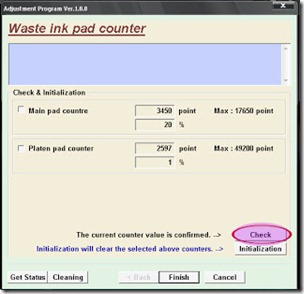
  • Select Waste ink pad counter
  • Click OK
  • Click Initialization (this will reset counter)
  • Turn off the printer
  • Then turn on again.
Finish

download windows 7 32bit  resetter but recommended to windows xp
Read More..

Epson Stylus T13 Epson Stylus ME32 end of service life error

| 0 komentar |

FIX PRINTER ERROR parts inside printer  end service life or part inside your printer is near end service life. Note: Before  opening  the program into your storage device, adjust first the date of your computer  depending of what kind of Epson Resetter. This program is compatible for Windows Xp and Windows 7 32 bit version. Extract the compressed files after changing the time of your pc systems So here's the guide. Epson resetter program windows 7 compatible.
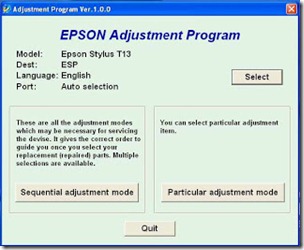
  • Open the . Click �Accept� button to open the program


adjustment

Click "Select" button. and choose your printer model then click "OK"

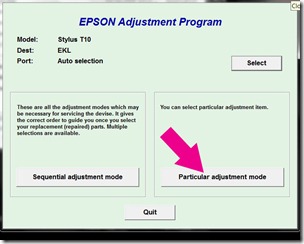
particular

Click �Particular adjustment mode� button.

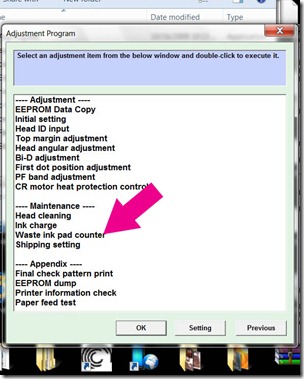
pad counter

Select on �Waste ink pad counter� and click �OK� button

initialize

Check on Main pad counter and click on �Initialization� button and the program will reset the protection counter.
  • Turn off the printer as a program instructed then turn on again
Note: I used different images  of resetter  because I don�t have time to open all the resetter and take a screenshot. Almost all of Epson adjustment program menu is identical.

Epson ME32 Reset Guide 


Read More..

Win32 Ramnit Virus Information and Removal

| 0 komentar |
W32/Ramnit.a is a virus that is file infector.  It y infects via unsecured network connection and removable drives including including  external hard disk drives. W32 Ramnit.a also spreads by infecting file on the system that is shared on a network environment.


ramnit.ay

Damage Level: Medium
Systems Affected: Windows 9x, 2000, XP, Windows Vista
 
The virus creates the following files:
%removabledrive%\�RECYCLER\�S-7-1-36-6133081425-6700277004-675130086-4217\�%variable1%.exe
  • %removabledrive%\�RECYCLER\�S-7-1-36-6133081425-6700277004-675130086-4217\�%variable2%.cpl
  • %removabledrive%\�autorun.inf
  • %removabledrive%\�Copy of Shortcut to (1).lnk
  • %removabledrive%\�Copy of Shortcut to (2).lnk
  • %removabledrive%\�Copy of Shortcut to (3).lnk
  • %removabledrive%\�Copy of Shortcut to (4).lnk
The virus acquires data and commands from a remote computer or the Internet.
The virus contains a list of addresses.
It can execute the following operations:
  • capture screenshots
  • send gathered information
  • download files from a remote computer and/or the Internet
  • run executable files
  • shut down/restart the computer
The virus may create the following files:
  • %system%\�dmlconf.dat
The virus connects to the following addresses:
  • google.com
  • bing.com
  • yahoo.com
The virus may create and run a new thread with its own program code within any running process.

The Removal  Instruction

To repair the problem:

  • update the anti-virus into it�s latest signature
  • Then run a quick scan in your computer
  • Run virus to infected external storage device
After the  Win32 Ramnit  worm virus removed. Follow the steps below to completely restore your external drive way back before the problem occur.
  • Open the external drive
  • Delete  all files except the drive icon that have no drive letter
  • Open the drive icon with no drive letter
  • Select all your files and cut or copy
  • Open external storage device (that is, flash drive, usb drive, external hard disk or whatever it is)
  • Paste your file
  • Then, delete the �the drive icon that have no drive letter�
More flask disk infector virus information
Read More..

Eset Trial Username and Password Updated

| 0 komentar |
List of Eset Nod32, Smart Security, Antivirus version 5 and 6 Trial Username and password updated as of year 2013

Username: TRIAL-58869447
Password: l5ibkojqg7

Username: TRIAL-53787984
Password: 19eynpqhcw

Username: TRIAL-57185625
Password: r8i5qszv76

Username: TRIAL-54646950
Password: azth3spcfj

Username: TRIAL-59604384
Password: rdl8s1jbi5

Username: TRIAL-55453074
Password: 3o68ye1ra7

Username: TRIAL-59352046
Password: 3lx6ued98f

Username: TRIAL-54169839
Password: p8qtovwh0y

Username: TRIAL-57621570
Password: 2vt9xcz80u

Username: TRIAL-50235618
Password: nclpb31vt2

Username: TRIAL-50245733
Password: t7bud4jzpa

Username: TRIAL-59377782
Password: 9zc17wyri3

Username: TRIAL-57238158
Password: 6wq0myiv9j

Username: TRIAL-57217503
Password: u5v9qs7wtc

Username: TRIAL-57990141
Password: 102e9qic5r

Username: TRIAL-56935947
Password: ns8zqu9mtp

Username: TRIAL-59310627
Password: 1to8mbe9xn

Username: TRIAL-51291810
Password: rg36aldset

Username: TRIAL-55683019
Password: 9c2uzypgij

Username: TRIAL-53420607
Password: 2m8zt5nodj
Read More..

Epson Stylus TX400 Reset

| 0 komentar |
Epson Stylus Printer TX410 and Epson Printer model TX415  with a problem parts inside printer near end service life or  parts inside printer end of service life or ink overflow error. Download and resetter and follow the guide to fix the  error code.

Download Epson Resetter program  here

Follow the steps below:
  • Open program, Click Accept
  • Click Select button, and click your printer model, Click "OK"
  • Click the Particular Adjustment Mode
  • Select Waste ink pad counter, Click OK
  • Click Initialization (this will reset counter)
  • Turn off the printer , then turn on again.
Finish!

Click to download Epson Resetter
Read More..